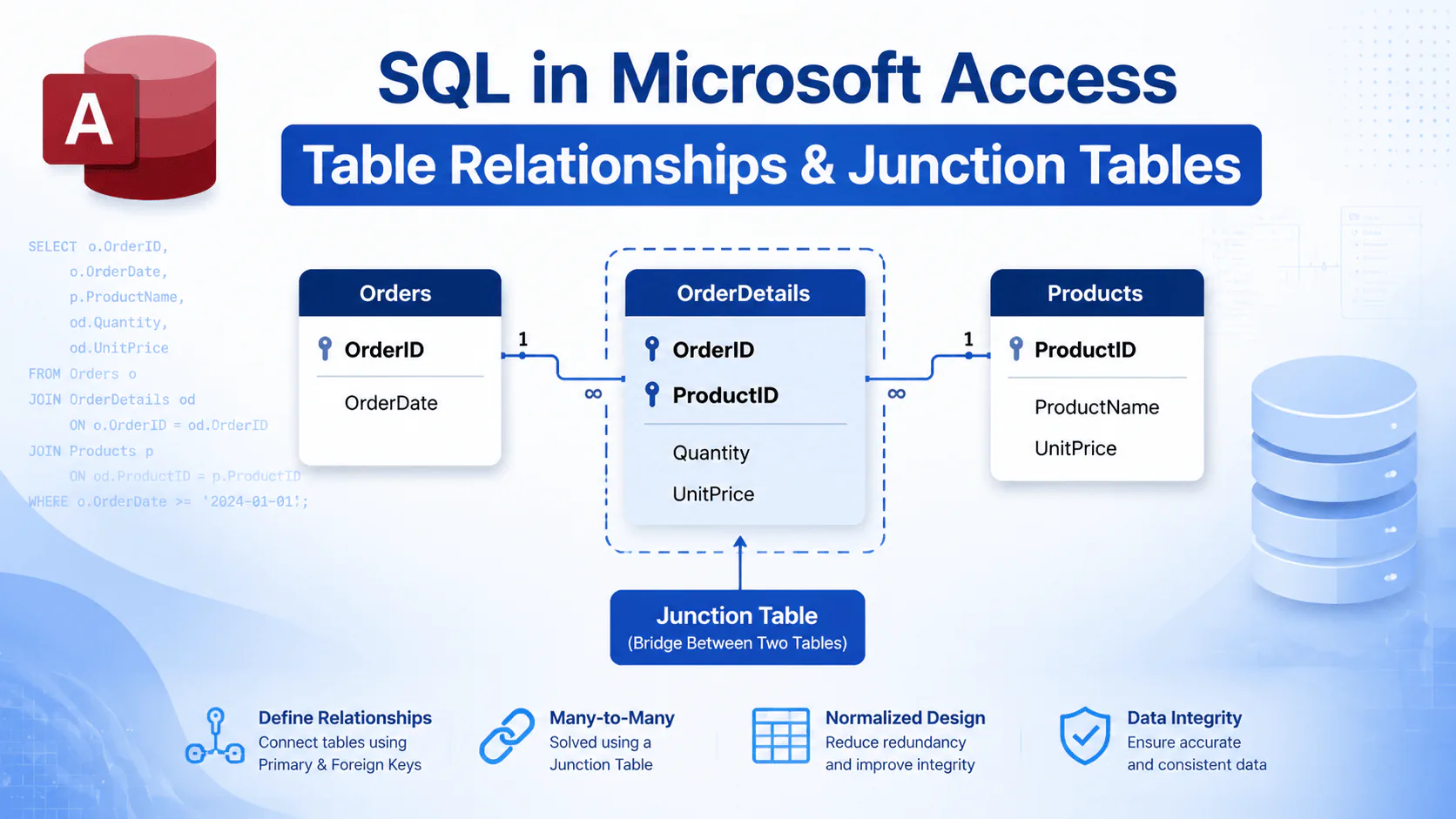
In relational databases, data is usually stored in multiple tables. To manage and retrieve related information efficiently, we need to create relationships between these tables. In the previous tutorial, we learned about Primary Keys and Foreign Keys and how they are used to connect tables.
In this tutorial, we will explore different types of relationships between tables in SQL and Microsoft Access. We will also learn how to create a Many-to-Many Relationship using a Junction Table.
Types of Relationships Between Tables
In relational databases, there are three main types of relationships between tables:
- One-to-One Relationship
- One-to-Many Relationship
- Many-to-Many Relationship
One-to-One Relationship
In a one-to-one relationship, each record in one table is related to only one record in another table. This type of relationship is usually used when we want to separate different types of information about the same entity into multiple tables.
For example, general user information can be stored in a Users table, while additional user details can be stored in a separate UserDetails table.
One-to-Many Relationship
A one-to-many relationship is the most common type of relationship between tables. In this type of relationship, one record from a parent table can be associated with multiple records from a child table.
For example, one customer can have multiple orders:
Customers
-----------
CustomerID (Primary Key)
CustomerName


Orders
-----------
OrderID (Primary Key)
CustomerID (Foreign Key)
OrderDate
In this example, the CustomerID field in the Orders table is a foreign key that references the Customers table.
Many-to-Many Relationship
In a many-to-many relationship, each record in the first table can be related to multiple records in the second table, and each record in the second table can also be related to multiple records in the first table.
For example, in a sales system:
- Each order can contain multiple products.
- Each product can appear in multiple orders.
Therefore, there is a many-to-many relationship between the Orders and Products tables.
Why Do We Need a Junction Table?
In relational databases, a foreign key cannot directly reference multiple records. Therefore, a third table called a Junction Table (or Bridge Table) is used to implement a many-to-many relationship.
In our example, the junction table will be named OrderDetails.
Designing Orders, Products, and OrderDetails Tables
CREATE TABLE Products (
    ProductID LONG NOT NULL,
    ProductName VARCHAR(100),
    Price CURRENCY,
    PRIMARY KEY (ProductID)
);


CREATE TABLE Orders (
    OrderID LONG NOT NULL,
    OrderDate DATETIME,
    PRIMARY KEY (OrderID)
);
Now we create the junction table. This table contains two foreign keys that connect it to the main tables.
CREATE TABLE OrderDetails (
    OrderID LONG NOT NULL,
    ProductID LONG NOT NULL,
    Quantity INTEGER,
    UnitPrice CURRENCY,

    PRIMARY KEY (OrderID, ProductID),

    FOREIGN KEY (OrderID)
    REFERENCES Orders(OrderID),

    FOREIGN KEY (ProductID)
    REFERENCES Products(ProductID)
);
Composite Primary Key
In the OrderDetails table, we used two fields, OrderID and ProductID, as the primary key. A primary key made of multiple fields is called a Composite Primary Key.
The reason for using a composite key is to ensure that the combination of an order and a product is unique. This prevents the same product from being added multiple times to the same order.
Creating Many-to-Many Relationships in Microsoft Access
In Microsoft Access, a many-to-many relationship is created by first designing a junction table. Then, two one-to-many relationships are created:
- Relationship between Orders and OrderDetails
- Relationship between Products and OrderDetails
In both relationships, the Enforce Referential Integrity option should be enabled to maintain data consistency.
Displaying Data from Multiple Tables Using JOIN
After creating relationships between tables, we can retrieve information from multiple tables using the JOIN statement.
SELECT
    Orders.OrderID,
    Products.ProductName,
    OrderDetails.Quantity
FROM
    (Orders
    INNER JOIN OrderDetails
    ON Orders.OrderID = OrderDetails.OrderID)
    INNER JOIN Products
    ON OrderDetails.ProductID = Products.ProductID;
In future tutorials, we will learn more about different types of JOIN statements in SQL and how to connect multiple tables in Microsoft Access.
Read More
Master Access SQL Constraints and Validation Rules
Access SQL DISTINCT: Remove Duplicate Results Easily
Access SQL Views and Saved Queries: Complete Guide
Access SQL ORDER BY: Sorting Query Results Quickly
Access SQL Data Types and Field Definitions Guide